
Druware Music Bingo
Game for a little Music Bingo? Ready to host your own game? leverage you Apple Music Playlists for a fun and easy way to host a Music Bingo Night. Or use any other music source for your playlist, including Sptofy, YouTube Music, or Prime Music.
Music Bingo Host App for Apple Music
Run a full music bingo night from your Mac, iPad, or iPhone — your playlist, your prizes, printable cards, and winner verification in seconds.
$14.99 once — no subscription on any of the app stores, direct downloads and purchases coming soon.
Turn any Apple Music playlist into a bingo night
Music bingo is simple to play and miserable to run by hand. Somebody has to make cards that are all different, remember which songs have played, and then check a winning card in front of a room of people who want their prize now.
Music Bingo does all of that. Point it at an Apple Music playlist — or paste a list of songs from anywhere — and it generates a deck of unique cards, exports them as a print-ready PDF, plays the music, tracks every song called, and tells you which cards are one song from winning before anyone shouts. Each session lives in its own document, so tonight's game, next Thursday's game, and the company party are three separate files you can prepare weeks ahead and reopen when you're ready.
How it works
1. Build your playlist (paste a song list, or use an existing Apple Music playlist)
Connect Apple Music and import any playlist from your library in a couple of taps. No playlist yet? Paste a plain list — one song per line, Title – Artist — and Music Bingo will build the session from it. There's a 60-song demo playlist built in if you just want to see how a game feels before committing.
If you started from a pasted list, one button looks every song up in the Apple Music catalog and saves a real playlist to your library, so the same session can then be played and tracked automatically.
2. Generate cards (PDF, two per page to cut printing cost)
Every card is a unique 5×5 grid — 24 songs and a free center square, with no two layouts alike. Print one card per page, or two per landscape sheet with a cut line down the middle to halve your paper.
Printed output uses clear cells and solid black borders instead of grey fills, which keeps toner use low on the office laser printer you're inevitably going to use. Your session's accent color and logo appear in the card header, and every card carries a unique ID and QR code.
3. Host the game (auto-advance timing, track called songs)
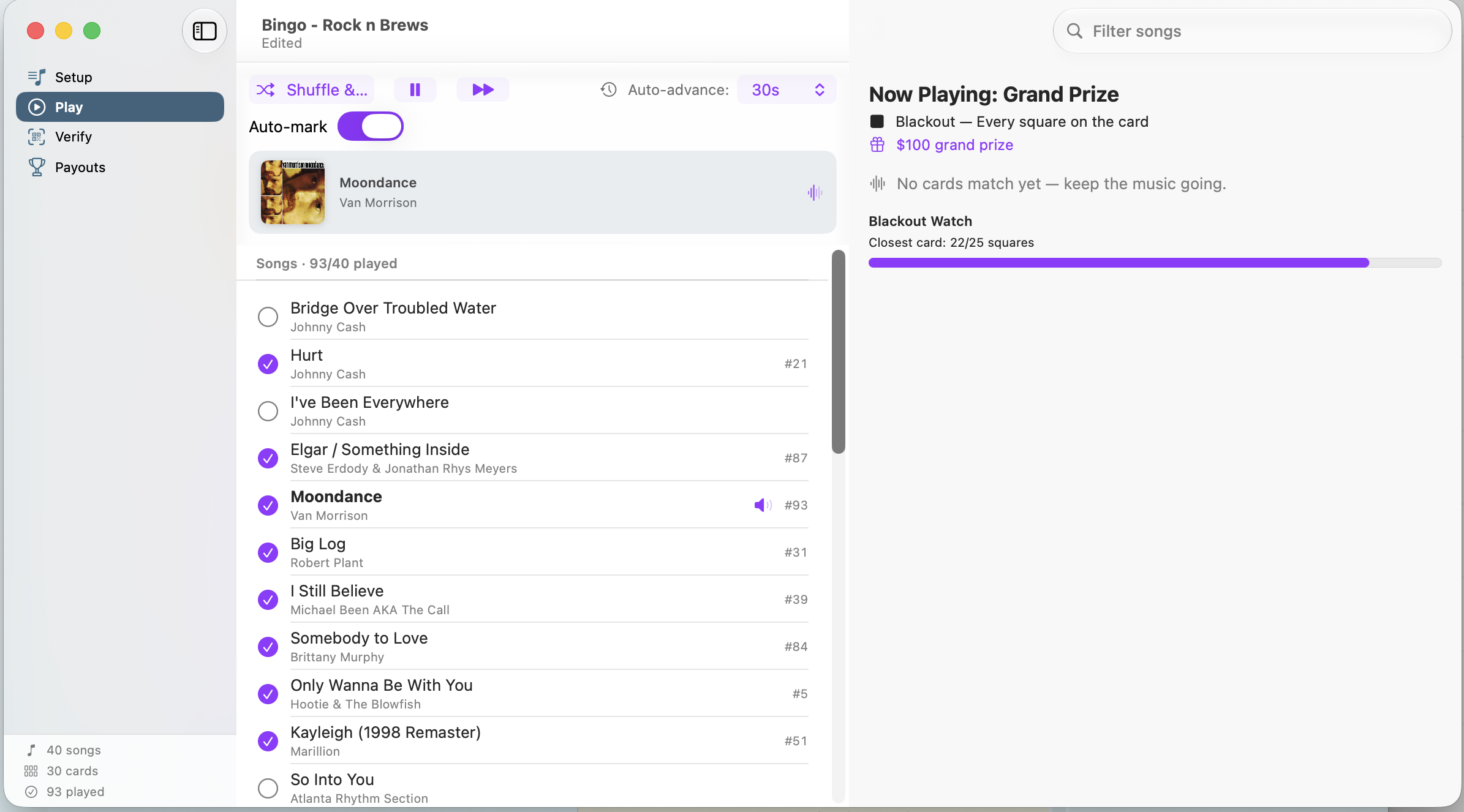
Hit Shuffle & Play and Music Bingo plays through your playlist, marking each song as called the moment it starts. Set auto-advance — 30 seconds, 45, a minute, 90 seconds, up to five minutes — so each clip plays just long enough for the room to recognize it, then moves on by itself. You keep your hands free for the microphone.
Not using Apple Music playback? Run in manual mode: play the music however you like and tap each song as you call it. You can use Shazam to auto track what you play too. Either way, the live match panel updates after every track with the cards that can call bingo, the cards one song away, and a blackout progress meter.
4. Verify winners
Someone yells BINGO. Type their card ID into the Verify screen, or scan the QR code on the card with your iPhone or iPad. You get an unambiguous green VALID BINGO or a "not a winner yet" with exactly how many songs they still need, plus the card's grid rendered on screen with its marked squares.
Card IDs combine a serial number with a fingerprint of that card's exact song layout, so a card from a different night — or a doctored one — won't validate. Award the win, and the Payouts screen tracks who won what across every round.
Features
- Unique cards, every time — 5×5 grids with a free center, guaranteed distinct layouts
- Print-ready PDF export — one or two cards per page, ink-efficient by design
- Apple Music playback and auto-marking — songs mark themselves as they play
- Manual mode with Auto Marking — works with any audio source, no subscription required
- Auto-advance timing — Off through five minutes, adjustable mid-game
- Live winner watch — who can call bingo, who's one away, closest to blackout
- QR and ID verification — fingerprinted cards that can't be faked or reused
- Flexible payout rounds — name, prize, and win pattern per round: single line, two lines, four corners, the X, or blackout
- Session theming — your event name, tagline, host name, accent color, and logo on every card
- Reset and replay — clear the game state but keep your printed deck for the next round
- Document-based — one file per event, prepared in advance, reopened anytime
- Crash-safe — game progress is checkpointed as you play
Who it's for
Bars, restaurants and pubs
Music bingo fills tables on slow weeknights. Set up a recurring session file with your bar-tab prize structure, print a stack of cards on Monday, and run the same night every week with a fresh playlist and zero prep.
DJs and event hosts
You already have the playlists and the sound system. Music Bingo handles the part that doesn't scale — card generation, tracking, and verification — while you keep the room's attention. Prep multiple client events as separate documents and switch between them.
Parties and family gatherings
Birthdays, holidays, reunions, wedding receptions. Build a playlist of songs the room actually knows, print a dozen cards, and you have an hour of entertainment that works for guests aged nine to ninety.
Apple Music, Spotify, and everything else
Music Bingo works best with Apple Music. On Apple devices, Windows and Android, it connects straight to your Apple Music library. It reads your playlists, plays them in the app and knows which track is playing, so songs get marked as they’re called without you touching anything. Hosting is as simple as pressing play.
Spotify works too, just differently. Spotify’s developer terms don’t allow games to use its API, so Music Bingo can’t connect to your Spotify account or control what it plays. Instead, paste in your song list or import a CSV export of your Spotify playlist. Then play from the Spotify app as usual and turn on Listen & Auto-Match. Music Bingo listens through the microphone, recognizes each song and marks it for you.
Any other source works the same way. That includes another streaming service, a DJ rig, a jukebox or vinyl: if the recording reaches the microphone, Listen & Auto-Match can pick it up. With a live band, or any time you’d rather do it yourself, just tap each song as you call it. Every other feature works the same whatever the source.
Requirements
- macOS 14 or later
- iOS 17 or later
- iPadOS 17 or later
- visionOS 1 or later
- Windows 10 or later
- Android 15 or later
- Optionally - An Apple Music subscription for in-app playback
- Microphone support for automatic song tracking in manual mode
- A printer, for paper cards
Pricing
Free to try. Download Music Bingo and run a real game — build a playlist, generate cards, print them, host, and verify winners — at no cost.
$14.99 one-time unlock. A single purchase removes the free-tier limits and unlocks full-size card decks and unlimited playlists. No subscription, no per-event fee, no ads. Buy it once and use it for every game night you ever run. Already purchased on another device? Restore Purchases brings it across.
Frequently asked questions
Do I need an Apple Music subscription? No. A subscription unlocks in-app playback and automatic song marking, which makes hosting nearly hands-free. Without one, use manual mode — play music from any source and tap songs as you call them. Every other feature is identical.
Is this a subscription? No. Music Bingo is free to try, with a single $14.99 unlock. There are no recurring charges and no per-event fees.
How many cards can I print? Enough for a full house. Generate a deck sized to your room, then export it as a PDF — one card per page, or two per sheet to halve your printing costs.
What happens if two people call bingo at once? Verify each card in turn. Scan the QR code or type the card ID, and Music Bingo confirms or rejects each one against the songs actually played, then records the winners on the Payouts screen.
Can someone bring a card from a different night and win with it? No. Every card ID contains a cryptographic fingerprint of that specific card's song layout, so cards from another session — or altered cards — fail verification automatically.
Can I reuse my printed cards for another game? Yes. Reset Game clears the played songs and winners while keeping your deck and playlist, so the same printed cards work for round after round.
What win patterns are supported? Single line, two lines, four corners, the X, and blackout. Build any sequence of rounds you like, each with its own name and prize — the default is four single-line rounds followed by a blackout grand prize.
Does it work without an internet connection? Card generation, printing, verification, and manual-mode hosting all work offline. Streaming music from Apple Music requires a connection.